In short: A QR code menu for restaurants is a digital menu guests open by scanning a code on the table. No app is needed, prices update instantly, and modern platforms add ordering, payments, loyalty and vouchers on top.
Printed menus are expensive to update, hard to translate and slow down service. That is why a QR code menu for restaurants has become a standard tool in cafés, bars, beach bars and hotels across Europe. In this guide we explain how it works, what to look for and how to launch one without technical knowledge.
What is a QR code menu for restaurants?
A QR code menu is an online version of your menu and price list. You print a QR code and place it on tables, at the bar or in hotel rooms. Guests point their phone camera at the code and the menu opens in the browser – with photos, descriptions, allergens and prices in their own language.
Because the menu lives online, you can change a price, hide a sold-out dish or add a daily special in seconds. Nothing has to be reprinted.
How does a QR code menu work in practice?
- Create the menu – add categories, items, photos, variants and extras in an online dashboard.
- Print the QR codes – put them on table tents, stickers, flyers or room cards.
- Guests scan – the menu opens instantly, without downloading an app.
- Optional: order and pay – guests send the order from their phone and pay online, or call the waiter with one tap.
Benefits of a QR code menu for restaurants and cafés
- Instant updates – change prices and items at any time, with no printing costs.
- Multi-language menus – tourists read the menu in their own language.
- Faster service – guests do not wait for the menu or the bill.
- Higher order value – photos and suggested extras sell more.
- Better hygiene and less waste – no worn or sticky paper menus.
- Data – see which items guests view and order most.
QR menu vs. full hospitality platform
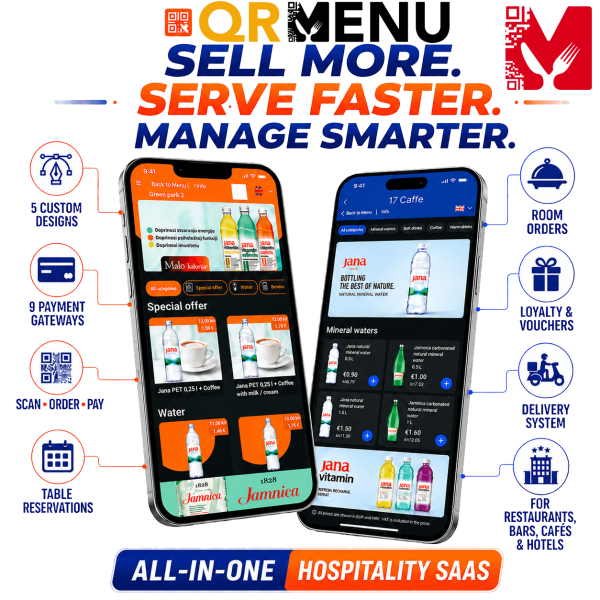
A basic QR menu only shows the menu. A modern platform such as QRMENU.ee connects the whole guest journey in one dashboard:
- ordering and online payments from the table (9+ payment gateways),
- own delivery and hotel room service without third-party commission,
- a loyalty system with points and rewards,
- voucher campaigns and promo codes that bring guests back,
- table reservations and a call-waiter button,
- real-time analytics and white-label branding.
Replacing several separate apps with one platform saves monthly fees and staff time – and the tools finally talk to each other.
How much does a QR code menu for restaurants cost?
Prices depend on features. On QRMENU.ee you can start with a 14-day free trial without a credit card. The Business plan for a full digital menu and price list starts at €28 per month, and the Ultimate plan with ordering and payments is €140 per month. Yearly plans are cheaper.
What to look for when choosing a QR menu
- No app required for guests – everything must open in the browser.
- Unlimited items, photos and languages.
- Easy editing from a phone, not only from a computer.
- Ordering, payments, loyalty and vouchers available when you need them.
- Zero commission on your own orders and delivery.
- Local support and help with setup.
Tips for a QR menu guests love
Use good photos for your best sellers, keep descriptions short and clear, and mark allergens and vegetarian options. Place the QR code where guests sit down, add a short line such as “Scan for menu & order”, and train staff to help older guests. Finally, promote your loyalty programme on the menu itself – it is the easiest way to turn a first visit into a regular guest.
Common mistakes with a QR code menu for restaurants
- PDF instead of a real menu – a scanned PDF is hard to read on a phone and cannot be updated quickly.
- Too small or hidden QR codes – guests should see the code the moment they sit down.
- No photos – images of signature dishes and drinks noticeably help guests decide.
- Only one language – in tourist areas, a menu in English, German or Italian saves staff time.
- Forgetting the team – waiters should know how the menu, ordering and call-waiter button work.
How a QR code menu for restaurants increases revenue
A digital menu is not only a cost saver. When guests can order a second round from the table without waiting, bars and beach bars sell more during peak hours. Suggested extras and add-ons increase the average bill, and loyalty points give guests a reason to come back. Voucher campaigns can fill quiet days – for example a discount code for lunch on weekdays.
Real-time analytics show which dishes are viewed but rarely ordered, so you can improve photos, descriptions or prices. Over a season, these small optimisations add up.
Example: a beach bar during the summer season
A typical beach bar has guests spread over a large area, few staff and long distances to walk. With QR codes on sunbeds and tables, guests open the menu in their own language, order drinks and snacks and pay online. Staff only bring the orders instead of taking them, the bar handles more orders with the same team, and seasonal price changes are made in minutes. At the end of the season, loyalty data and vouchers help bring the same guests back next year.
Official website: qrmenu.ee
Launch your QR code menu today
QRMENU.ee is trusted by 600+ venues in 16 countries. Start a free trial or let the EXOND team set everything up for you.
Frequently asked questions
Do guests need an app to use a QR code menu?
No. The menu opens in the phone’s web browser after scanning the QR code.
Can I change prices on a QR menu at any time?
Yes. Changes in the dashboard are visible to guests immediately, with no reprinting.
Can guests order and pay through the QR menu?
Yes, with platforms like QRMENU.ee guests can order from the table and pay online with 9+ payment gateways.
Is a QR code menu for restaurants also suitable for hotels?
Yes. The same platform can handle restaurant, bar and room service orders.